 AQUALYTICS
Deck-fast capture
Stopwatch or manual key-in for Free, Back, Breast, Fly, and IM. Training or competition — offline-first, then sync.
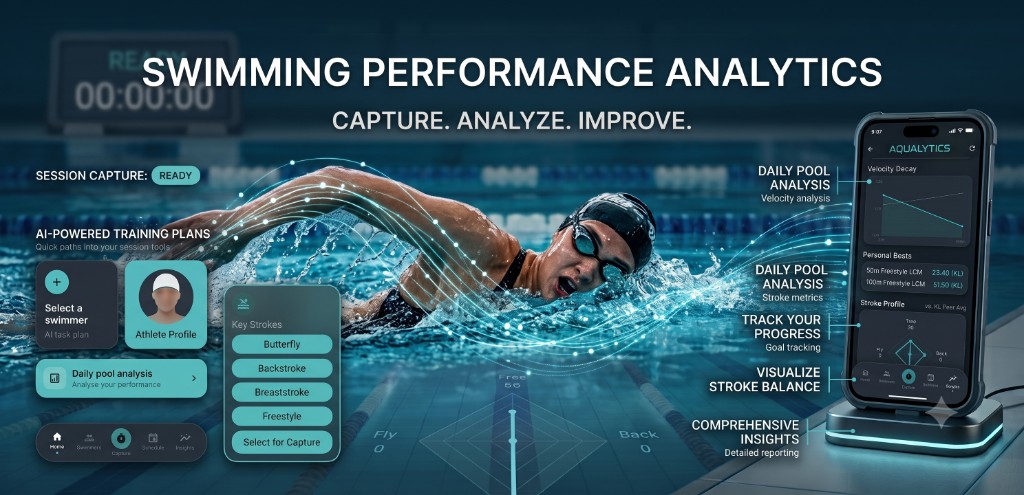
Capture. Analyze. Improve.
Deck-fast timing, meet-day reminders, and performance insights — so you can swim smarter.
Why Aqualytics
Capture times with one thumb. Track a squad or a family. Never miss the calling room. Then see progress that actually guides training.
Stopwatch or manual key-in for Free, Back, Breast, Fly, and IM. Training or competition — offline-first, then sync.
Parents and coaches follow multiple athletes from one account — profiles, PBs, and history in one place.
Staged prepare → calling room → final nudge alerts, plus meet pace offset when the meet runs early or late.
Stroke profile, form %, and weekly load at a glance — your athlete’s performance identity in one snapshot.
Trend is free when you sign in. Velocity decay, split pacing, goals, and more unlock with Pro — charts grounded in the times you actually capture.
Evidence-based tips from real splits and personal bests — plain language you can act on at the next session.
Get the app
Available for iPhone and Android. Download from the App Store or Google Play.
User manual
Short guides for each chart — what it means, and a real situation where it helps you coach or train smarter.
This chart shows your swimmer’s speed (meters per second) from the start of a race to the finish. A line that stays high means they held their speed; a sharp drop means they faded.
Your swimmer dies in the last 50m — the line falls hard late. Fix: practice even pacing, not just a fast start.
This radar chart compares how strong your swimmer is in each stroke — Freestyle, Backstroke, Breaststroke, Butterfly, and IM. A bigger area on one stroke means that stroke is stronger.
Fly looks tiny on the chart while Free is strong. Plan more fly sets this month — don’t guess which stroke is weak.
The teal bars show how much they swam each week (training volume). The line shows how close their race times are to their personal best — a higher line means they are racing sharper.
Training volume stays high but race times get worse (line drops). Ease the load, add recovery, then watch the line climb back toward PB.
Form shows how close recent swims are to your swimmer’s personal best. Near 100% means they are close to their best time; a lower reading means they are slower right now — useful when you are tapering before a meet.
Before a big meet, check form is rising toward PB — then you know taper is working.
Trend plots your swimmer’s times for one stroke and distance over weeks or months. As the line moves down, they are getting faster. Gold markers highlight when a new personal best was set.
Parent asks “are we improving?” — show the line dropping and the latest PB.
Split pacing breaks one race into each lap’s time. If the bars get taller toward the end, your swimmer started too fast and slowed down — a clear signal to work on even pacing.
First lap too fast, last laps slow — coach even splits in the next session.
What-if pacing lets you try different lap targets before the meet. Change the plan and Aqualytics projects the finish time, so you can choose a race strategy that fits the goal.
Aim for 1:05 — try “even splits” vs “negative split” and pick a plan.
This chart compares training times and competition times for the same stroke and distance. You can see whether practice times and meet results are moving together — or if race-day performance is pulling ahead.
Training looks slow but meet times drop — proof that race sharpness is coming through.
Goals show the target time you set and how your swimmer is progressing toward it. The solid line is real progress; the dashed line projects where they are headed if they keep improving at the current rate.
Set “under 30.00 by June” and see if current progress is on track.
Subscription
Capture, meet-day tools, and a basic Insights trend stay free. Deeper analysis unlocks with Aqualytics Pro — monthly or yearly.
Core tools for deck and meet day
Full insights, AI, and coaching depth
Prices vary by country and store. Open Plans & pricing in the app (or on App Store / Google Play) to see the exact amount for your region.
Support
Subscriptions and purchases are billed by Apple or Google. Refunds generally follow each store’s policies. If you need help from the Aqualytics team, email us directly.
Send your request to syaifuddin.khalid@gmail.com with the subject line Aqualytics - Refund Request.
Please include: